Skip to content
Best Java Classesin Pune

Development

Java Full Stack Developer Course in Pune

This Java full stack course in Pune teaches you to build complete web applications: core Java and OOP, SQL databases, Spring Boot REST APIs and React front ends. It suits graduates, freshers and career switchers who want a developer role and would rather learn by shipping working projects than by memorising theory.

  • A Java full stack developer builds both what users see and the server logic behind it.
  • Full stack means owning the client side and the server side of a web application.
  • You'll use Java on the back end with HTML, CSS, JavaScript and a modern framework on the front end.

Java FullStack Banner

Java Full Stack: quick answers

What will I build in the Java full stack course?
You'll build a working web app end to end — a Spring Boot REST API backed by MySQL, with a React front end that calls it — and finish with a capstone you can put on GitHub and walk an interviewer through.
Do I need coding experience to join?
No. The course starts with Java basics like variables, loops and methods, so a complete beginner can follow along; what matters more is practising a little every day.
Is Java still in demand in 2026?
Yes. Java runs a large share of banking, insurance, e-commerce and enterprise backends, and Spring Boot remains one of the most common stacks in job listings for backend developers.
Which Java version and frameworks does the course use?
You'll work with a current long-term-support Java release, Spring Boot with Spring Data JPA and Hibernate, MySQL, and React for the front end — the same combination many product and services teams use.
What are the fees and duration of the Java full stack course?
Fees, duration and batch timings are set for each intake, so they change over time. The enquiry form or a quick call gets you the current schedule and fee details.

Who this course is for

Join if you are…

  • Final-year students and fresh graduates (BE, BTech, BCA, MCA, BSc) aiming for their first developer job
  • Career switchers from non-IT or support roles who want a structured route into programming
  • Manual testers or support engineers who want to move into development
  • Self-taught learners who know some Java syntax but have never built a complete application
  • Front-end developers who want to understand and own the backend too

By the end you will be able to…

  • Write clean, object-oriented Java and explain why you structured the code the way you did
  • Design a relational database, write SQL joins and map tables to entities with JPA and Hibernate
  • Build secure REST APIs with Spring Boot, including validation, error handling and JWT login
  • Create a React front end that consumes your own API, with routing, forms and state
  • Test your code with JUnit and Mockito, and verify endpoints in Postman
  • Use Git, Maven and Docker to manage, package and deploy a full stack project

Java Full Stack syllabus

124 modules, from fundamentals to job-ready practice.
  1. 01

    Stream API

    • What is Stream?:
    • A sequence of data elements supporting functional-style operations.
    • Types of Stream – Sequential & Parallel Stream:
    • Sequential processes elements one by one; parallel splits workload across cores.
    • java.util.stream Package:
    • Provides classes like Stream, Collectors, and utility methods.
    • Stream Operations – Intermediate and Terminal Operations:
    • Intermediate (map(), filter()) transform streams; terminal (collect(), forEach()) produce results.
    • map(), reduce(), filter(), forEach(), limit(), skip() Methods:
    • Functional operations for processing collections.
    • Collectors – toCollection(), toList(), toSet(), toMap() Methods:
    • Converts streams into various collection types.
  2. 02

    Tags, Elements, and Attributes

    • Inline vs. Block-level elements: Differentiate between inline and block-level elements and their use cases.
    • Custom data attributes (data-*): Utilize data attributes for storing custom metadata in elements.
    • Global attributes in HTML5: Learn about commonly used global attributes applicable to all HTML elements.
  3. 03

    Introduction to Bootstrap (Responsive)

    • The power of Bootstrap's grid system: Utilize Bootstrap’s responsive layout framework for flexible designs.
    • Importance of mobile-first design: Develop websites optimized for mobile devices first.
  4. 04

    Communicating with the Server Using HTTP, Observables, and RxJS

    • Moving data storage to the server: Manage application data through backend integration.
    • Listening to resolved data changes: Use Observables to handle asynchronous data.
    • Using query string parameters: Pass additional data through API requests.
    • Saving user data to the server: Implement backend storage solutions for user inputs.
  5. 05

    Introduction to HTML(Java FullStack)

    • What is HTML, and why is it essential for web development?: HTML (HyperText Markup Language) is the standard language for structuring web pages, essential for defining content, layout, and elements on the web.
    • Differences between HTML4 and HTML5: HTML5 introduces new semantic elements, multimedia support, APIs, and improved performance, making it more powerful and flexible than HTML4.
    • New web standards and evolution of HTML: The evolution of HTML aligns with modern web standards, enhancing accessibility, performance, and interactivity through features like semantic tags, APIs, and responsive design.
  6. 06

    Lists (Java FullStack)

    • Customizing lists with CSS: Changing list styles using list-style-type, list-style-image, or custom bullets with ::before.
    • Nesting lists within other lists: Ordered (<ol>) and unordered (<ul>) lists can be nested for hierarchical structures.
  7. 07

    Semantic and Non-Semantic Tags

    • The transition from HTML4 to HTML5: HTML5 replaces generic <div> structures with semantic elements for better readability and SEO.
    • HTML5's new structural elements: <header>, <footer>, <article>, <section>, <nav>: These elements define specific content areas, improving accessibility and SEO.
    • Deprecation and removal of tags in HTML5: Tags like <font>, <center>, and <big> are deprecated in favor of CSS-based styling.
    • List of non-semantic tags and their usage (<div>, <span>)
    • <div>: Used for generic containers.
    • <span>: Used for styling inline elements.
  8. 08

    HTML5 Features

    • Web Storage (localStorage, sessionStorage): Stores data in the browser for persistent (localStorage) or session-based (sessionStorage) usage.
    • Geolocation API: Allows web apps to access a user's location with permission.
    • HTML5 Forms and Validation: Enhances form handling with built-in validation and new input types.
  9. 09

    Form Attributes

    • formaction, formmethod (get, post): formaction: Defines the URL where form data is sent.formmethod: Specifies HTTP method (GET for visible data, POST for secure data).
    • HTML5 form validation attributes: pattern, required, minlength: pattern: Defines custom regex validation.required: Ensures input is mandatory.
    • minlength: Sets minimum character length for input.
  10. 10

    CSS Selectors and Attributes (Java FullStack)

    • Overview of common CSS attributes: Common CSS properties include color, font-size, margin, padding, border, width, and height to style web elements.
    • Types of Selectors
    • CSS selectors include universal (*), element (h1), class (.class), id (#id), group (h1, p), attribute ([type="text"]), and combinators.
    • Differences between id and class selectors
    • id: Unique identifier (#id) for a single element.
    • class: Reusable (.class) for multiple elements.
  11. 11

    CSS Types (Inline, Internal, External)

    • Advantages and disadvantages of each CSS method
    • Inline CSS: Quick but hard to maintain.
    • Internal CSS: Good for single pages but less reusable.
    • External CSS: Best for consistency and scalability.
    • Linking external stylesheets and using inline styles: External stylesheets use <link rel="stylesheet" href="style.css">, while inline styles use style="color: red;".
  12. 12

    Box Model (Java FullStack)

    • Understanding the CSS box model (Content, Padding, Border, Margin): The box model consists of:
    • Content: The actual text or image.
    • Padding: Space inside the border.
    • Border: Surrounds padding and content.
    • Margin: Space outside the border.
    • Modifying box model properties to affect layout: Adjust margin, padding, border, and width/height to control spacing and positioning.
  13. 13

    Display Property (Block, Inline, None)

    • The difference between block, inline, and inline-block elements
    • Block: Takes full width (e.g., <div>).
    • Inline: Fits content width (e.g., <span>).
    • Inline-block: Like inline but allows width/height control.
    • display: none vs visibility: hidden
    • display: none: Removes the element from layout.
    • visibility: hidden: Keeps space but hides content.
  14. 14

    Visibility-Hidden

    • Practical usage of visibility property: Used for tooltips, toggling elements without affecting layout.
    • Difference between visibility: hidden and display: none: visibility: hidden hides the element but keeps its space, while display: none removes it entirely.
  15. 15

    Position Property (Static, Relative, Absolute, Fixed)

    • Positioning elements: static, relative, absolute, fixed, and sticky
    • static: Default position.
    • relative: Moves relative to itself.
    • absolute: Positioned relative to the nearest positioned ancestor.
    • fixed: Stays in place even when scrolling.
    • sticky: Sticks to a position when scrolling.
    • Practical examples of element positioning: Sticky headers, fixed navigation bars, absolute positioning for modals.
  16. 16

    Z-Index Property (Java FullStack)

    • Layering elements using z-index: Controls the stacking order of overlapping elements. Higher values appear on top.
    • Importance of stacking context: The stacking context affects how elements are layered in relation to their parents.
  17. 17

    Combinators

    • Descendant Selector (space), Child Selector (>), Adjacent Sibling Selector (+), General Sibling Selector (~)div p: Selects all <p> inside <div>.
    • div > p: Selects direct child <p>.
    • h1 + p: Selects the first <p> after <h1>.
    • h1 ~ p: Selects all <p> after <h1>.
  18. 18

    CSS Pseudo-Classes

    • Pseudo-classes like :hover, :focus, :nth-child, and :not
    • :hover: Styles on hover.
    • :focus: Styles when focused (input fields).
    • :nth-child(n): Targets specific child elements.
    • :not(selector): Excludes elements.
  19. 19

    CSS Pseudo-Elements

    • Styling the first letter, first line, and content insertion using ::before, ::after
    • ::first-letter: Styles the first letter.
    • ::first-line: Styles the first line of text.
    • ::before/::after: Inserts content before or after an element.
  20. 20

    Background and Multiple Backgrounds

    • Applying background colors, images, and gradients: Use background-color, background-image, background-repeat, and background-size.
  21. 21

    Font-Related Features

    • Using custom web fonts via @font-face and Google Fonts: Import fonts using @font-face or <link> to Google Fonts.
    • Font properties: font-family, font-size, font-weight, font-style, etc.: Control text appearance using CSS font properties.
  22. 22

    Text-Effect and Box-Effect

    • Text shadow, box shadow, text transform
    • text-shadow: Adds a shadow effect to text.
    • box-shadow: Creates a shadow around elements.
    • text-transform: Controls uppercase, lowercase, or capitalization.
  23. 23

    Gradients (Linear and Radial)

    • Creating linear and radial gradients with CSS
    • linear-gradient(direction, color1, color2).
    • radial-gradient(shape, color1, color2).
  24. 24

    Transition

    • Common transition properties: transition-property, transition-duration, transition-timing-function
    • Controls smooth animations between states.
  25. 25

    Transformation

    • Using transform to rotate, scale, skew, and translate elements
    • Apply rotate(), scale(), skew(), and translate() for animations.
  26. 26

    Media Queries

    • Creating responsive layouts using @media queries
    • Define breakpoints for different screen sizes using @media.
  27. 27

    Typography

    • Font styles, sizes, and alignments in Bootstrap: Bootstrap includes predefined typography classes.
  28. 28

    Tables (Java FullStack)

    • Advanced table designs using Bootstrap: Uses .table, .table-striped, .table-bordered for better styles.
    • Responsive tables with .table-responsive: Makes tables scrollable on smaller screens.
  29. 29

    Images, Buttons

    • Using Bootstrap classes for styling images and buttons.btn-primary, .btn-success, .img-fluid.
  30. 30

    Grid Structure and Types of Columns

    • Understanding the Bootstrap grid system: Rows, Columns, and Breakpoints
    • Columns (col-xs, col-sm, col-md, col-lg) adjust layouts dynamically.
  31. 31

    Forms (Java FullStack)

    • Styling forms with Bootstrap’s built-in form controlsUses .form-control, .form-group.
  32. 32

    Jumbotron (Java FullStack)

    • Using .jumbotron for prominent page sections: Creates large, attention-grabbing content sections.
  33. 33

    Carousel

    • Creating Bootstrap Carousels for image sliders: Uses .carousel to create interactive sliders.
  34. 34

    Responsive Web Page

    • Best practices for responsive design with Bootstrap: Combine grid systems, media queries, and Bootstrap utilities.
  35. 35

    JavaScript (Java FullStack)

    • JavaScript in web development:
    • A versatile scripting language that enhances web pages with interactivity and dynamic behavior.
    • History and evolution of JavaScript:
    • Developed in 1995, JavaScript evolved into a powerful language for front-end and back-end development.
  36. 36

    Use of JavaScript

    • JavaScript in interaction and behavior of websites:
    • Enables interactive elements like animations, forms, and dynamic content updates.
    • Integrating JavaScript with HTML and CSS:
    • JavaScript manipulates HTML and CSS for real-time changes and enhanced UI/UX.
  37. 37

    Variables (Java FullStack)

    • Declaring variables using var, let, and const:
    • Defines variables with different scoping rules for better code management.
  38. 38

    Keywords (Java FullStack)

    • JavaScript reserved keywords and naming conventions:
    • Reserved words like if, return, and function cannot be used as variable names.
  39. 39

    Data Types

    • Primitive types:
    • Basic data types like String, Number, Boolean, Null, and Undefined.
    • Non-primitive types:
    • Complex types like Objects, Arrays, and Functions.
  40. 40

    JS Conditions

    • Using if, else, switch, and conditional operators:
    • Control flow structures that execute different blocks of code based on conditions.
  41. 41

    Loops

    • Using for, while, and do-while loops:
    • Iterates over data or executes a block repeatedly based on conditions.
    • Loop control with break and continue:
    • Alters loop execution by stopping (break) or skipping (continue) iterations.
  42. 42

    Functions

    • Defining and calling functions:
    • Encapsulates reusable logic in named blocks for structured programming.
    • Function parameters and return values:
    • Pass input values and retrieve processed results from functions.
  43. 43

    Arrays (Java FullStack)

    • Creating and accessing arrays:
    • Stores multiple values in a single variable.
    • Array methods:
    • Built-in functions like push(), pop(), map(), and filter() for array manipulation.
    • Iterating through arrays:
    • Loop through elements using for, forEach(), or map().
    • Destructuring of arrays:
    • Extract values from arrays into separate variables using the destructuring syntax.
  44. 44

    Strings (Java FullStack)

    • Using backticks for multi-line strings and variable interpolation:
    • Template literals allow multi-line strings and embedding variables with ${}.
  45. 45

    Spread and Rest Operators

    • Spread (...) for arrays and objects:
    • Expands elements of an array or object.
    • Rest (...) for function parameters:
    • Groups multiple arguments into an array.
  46. 46

    Objects

    • Creating objects:
    • Define objects using literals {} or new Object().
    • Accessing object properties:
    • Retrieve values using dot (obj.key) or bracket notation (obj["key"]).
    • Methods inside objects:
    • Functions within objects for encapsulated behavior.
    • Destructuring of objects:
    • Extract object properties into variables using { key1, key2 } = object.
  47. 47

    SetTimeout and SetInterval

    • Using setTimeout() and setInterval() for time-based actions:
    • Executes code after a delay (setTimeout) or repeatedly (setInterval).
  48. 48

    HTML DOM

    • Introduction to the Document Object Model (DOM):
    • JavaScript representation of HTML elements for dynamic manipulation.
    • DOM methods for interacting with HTML elements:
    • Modify and control webpage elements.
    • Selecting DOM Elements:
    • Retrieve elements using getElementById() and getElementsByClassName().
    • Changing text content:
    • Modify text using innerText.
    • Changing HTML content:
    • Update elements dynamically with innerHTML.
    • Changing attributes:
    • Get or set attributes using setAttribute() and getAttribute().
    • Adding/removing elements:
    • Dynamically modify the DOM with createElement(), appendChild(), and removeChild().
  49. 49

    Event Handling

    • Adding event listeners (addEventListener()):
    • Attach interactive behavior to elements using event handlers.
  50. 50

    Asynchronous JavaScript

    • Understanding synchronous vs asynchronous code:
    • Synchronous executes line-by-line, while asynchronous allows non-blocking execution.
    • Promises:
    • Handle asynchronous operations and avoid callback hell.
    • Async/Await:
    • Syntactic sugar for handling promises efficiently.
  51. 51

    JavaScript Classes and Prototypes

    • Introduction to ES6 Classes:
    • Blueprint for creating objects with methods and properties.
  52. 52

    React (Java FullStack)

    • What is React?
    • A JavaScript library for building dynamic and reusable UI components.
    • Component-based architecture:
    • Modular development approach using self-contained UI components.
    • Installing React:
    • Setup a React project using Create React App.
    • Development environment:
    • Organizing files and setting up React applications.
  53. 53

    JSX Syntax and Data Binding

    • What is JSX?
    • A syntax extension that allows writing HTML inside JavaScript.
    • Embedding expressions, attributes, and class names in JSX:
    • Use {} for dynamic values inside JSX.
    • Expressions in JSX:
    • Embed JavaScript expressions using {}.
    • Using className for class attributes:
    • React uses className instead of class for CSS classes.
  54. 54

    Components (Java FullStack)

    • Functional vs. Class Components:
    • Functional components are simpler, while class components have lifecycle methods.
    • Props and State in React:
    • Props pass data to components, while state holds internal data.
    • Component lifecycle methods:
    • componentDidMount(), useEffect(), and other lifecycle-related methods.
    • Using useEffect:
    • Hook for handling side effects in functional components.
    • Props validation with PropTypes:
    • Ensures correct prop types are passed to components.
  55. 55

    State Management (Java FullStack)

    • State and lifecycle management:
    • Update and manage component state efficiently.
    • Context API:
    • Manages global state without prop drilling.
  56. 56

    React Router

    • Setting up navigation:
    • Implement routing with react-router-dom.
    • Creating Routes and Navigation Links:
    • Define paths using <Route> and <Link>.
  57. 57

    React Forms

    • Controlled vs. Uncontrolled Components:
    • Controlled forms use state, while uncontrolled forms use refs.
    • Form Submission, Validation, and Reset:
    • Handle form input and validation in React.
  58. 58

    React Hooks

    • Using Built-in Hooks:
    • useState, useEffect, useContext, useReducer, etc.
    • Custom Hooks:
    • Create reusable logic in React applications.
  59. 59

    State Management Libraries

    • Redux:
    • State management with actions, reducers, and a centralized store.
    • State Management with Context API:
    • Alternative to Redux for lightweight global state management.
  60. 60

    Working with HTTP Requests

    • Making API calls:
    • Fetch data using fetch() or Axios in React applications.
  61. 61

    Bootstrap for Styling

    • Integrating Bootstrap with React:
    • Use Bootstrap classes for responsive UI design.
  62. 62

    Introduction to TypeScript (Java FullStack)

    • Overview of TypeScript and its benefits over JavaScript
    • Exploring TypeScript’s features and advantages over JavaScript.
    • Installation and setup of TypeScript
    • Setting up TypeScript and configuring a development environment.
    • Configuring TypeScript with tsconfig.json
    • Managing TypeScript project settings using tsconfig.json.
  63. 63

    Basic Syntax and Types(Java FullStack)

    • Variables, constants, and data types in TypeScript
    • Declaring variables and understanding TypeScript’s type system.
    • Type inference vs. explicit typing
    • Comparing automatic type inference with explicit type annotations.
  64. 64

    TypeScript Functions (Java FullStack)

    • Defining functions and understanding return types
    • Writing functions with proper type annotations for inputs and outputs.
    • Function overloading and default parameters
    • Implementing multiple function signatures and default values.
    • Arrow functions and anonymous functions
    • Using modern function syntax for cleaner and more concise code.
  65. 65

    Classes and Objects (Java FullStack)

    • Classes, constructors, properties, and methods
    • Defining and using classes with constructors, properties, and methods.
    • Access modifiers (public, private, protected)
    • Controlling access to class members using visibility modifiers.
    • Inheritance and method overriding
    • Extending classes and modifying inherited methods.
    • Static members and getter/setter
    • Using static properties, methods, and accessor methods.
  66. 66

    Interfaces and Types

    • Defining and using interfaces in TypeScript
    • Structuring objects with interfaces for type safety.
    • Optional properties, read-only properties, and method signatures in interfaces
    • Creating flexible interfaces with optional and read-only attributes.
    • Type aliases and differences with interfaces
    • Differentiating between type aliases and interface definitions.
  67. 67

    Overview of Angular (Java FullStack)

    • What is Angular? Why use it?
    • Introduction to Angular and its advantages in modern web development.
    • Key features of Angular
    • Exploring core features like dependency injection, modularity, and directives.
    • Installing Angular CLI and creating your first Angular project
    • Setting up an Angular project using the CLI.
  68. 68

    Angular Architecture and Structure

    • Understanding Angular application structure
    • Learning about modules, components, and services.
    • Bootstrapping Angular apps
    • Understanding how Angular applications initialize and run.
    • Angular Lifecycle hooks
    • Managing component behavior using lifecycle hooks like ngOnInit.
  69. 69

    Components in Angular

    • Creating components using ng generate component
    • Generating components using the Angular CLI.
    • Understanding the component lifecycle
    • Managing component behavior using lifecycle hooks.
  70. 70

    Data Binding in Angular

    • Introduction to Data Binding
    • Understanding data synchronization between the UI and logic.
    • Types of Data Binding in Angular
    • Exploring interpolation, property binding, event binding, and two-way binding.
  71. 71

    Directives in Angular (Java FullStack)

    • Structural Directives
    • Using ngIf, ngFor, and ngSwitch to manipulate the DOM.
    • Attribute Directives
    • Styling and behavior control using ngClass and ngStyle.
    • Creating Custom Directives
    • Defining reusable custom directives in Angular.
  72. 72

    Creating and Communicating Between Components

    • Creating data-bound components
    • Binding data between components for dynamic UI updates.
    • Communicating with child components using @Input
    • Passing data from parent to child components.
    • Communicating with parent components using @Output
    • Emitting events from child to parent components.
    • Using template variables
    • Directly referencing child components in templates.
  73. 73

    Styling Components

    • Exploring Angular's CSS encapsulation
    • Understanding scoped styling in Angular components.
    • Using Bootstrap and Angular Material
    • Integrating UI frameworks for responsive design.
  74. 74

    Pipes (Java FullStack)

    • Built-in pipes
    • Formatting data using built-in Angular pipes (date, currency, etc.).
    • Creating custom pipes
    • Developing custom pipes for transforming data.
    • Pipe chaining and pure vs. impure pipes
    • Understanding performance optimizations with pure and impure pipes.
  75. 75

    Angular Forms (Java FullStack)

    • Template-driven forms
    • Creating forms using Angular’s template-driven approach.
    • Handling user input with form controls
    • Managing form values and validations.
    • Form validation
    • Implementing built-in and custom validation rules.
    • Reactive forms
    • Building dynamic forms using FormGroup, FormControl, and FormArray.
  76. 76

    Routing in Angular

    • Introduction to Angular Routing
    • Setting up navigation and routes in Angular.
    • Defining routes using RouterModule
    • Configuring routes and navigation structure.
    • Route parameters and handling dynamic routes
    • Accessing dynamic data in URL parameters.
  77. 77

    Creating and Using Services with HttpClientModule (Java FullStack)

    • Creating Angular services
    • Using services to share data across components.
    • Injecting services in components
    • Implementing dependency injection in Angular.
    • Making HTTP requests
    • Performing CRUD operations with HttpClientModule.
    • Handling HTTP responses and errors
    • Managing API responses and error handling.
  78. 78

    Object-Oriented Programming Concepts (Java FullStack)

    • Object
    • A real-world entity with state, behavior, and identity.
    • Characteristics of an Object
    • Defined by state (attributes), behavior (methods), and identity (unique reference).
    • State
    • Represents the data or attributes of an object.
    • Behavior
    • Defines the actions an object can perform.
    • Identity
    • A unique identifier that distinguishes one object from another.
    • Responsibility
    • The set of tasks an object is designed to perform.
    • Major Pillars
    • Abstraction, Encapsulation, Inheritance, and Polymorphism.
    • Abstraction
    • Hiding implementation details and exposing only the necessary functionalities.
    • Encapsulation
    • Wrapping data and methods together and restricting direct access.
    • ‘IS A’ relationship – Inheritance
    • A mechanism where one class inherits the properties of another.
    • ‘HAS A’ relationship – Containment
    • A class containing an instance of another class as a field.
    • Polymorphism
    • Ability of an object to take multiple forms, enabling method overriding and overloading.
  79. 79

    Introduction to Java (Java FullStack)

    • Features of Java
    • Platform-independent, object-oriented, secure, multi-threaded, and robust.
    • Java Compiler
    • Converts Java source code into bytecode.
    • Java Runtime Environment (JRE)
    • Provides runtime libraries and supports Java program execution.
    • Bytecode Verifier
    • Ensures the security and integrity of Java bytecode.
    • Class Loader
    • Loads Java classes into memory dynamically.
    • JiT Compiler
    • Converts bytecode into native machine code for improved performance.
    • JDK, JRE, JVM
    • JDK (Java Development Kit) includes JRE and compiler, JRE (Java Runtime Environment) runs Java programs, and JVM (Java Virtual Machine) executes bytecode.
  80. 80

    Java Language Fundamentals (Java FullStack)

    • Classes and Object
    • Blueprints for creating objects with attributes and behaviors.
    • Class Syntax
    • Defines a class structure with fields, methods, and constructors.
    • Primitive Data Types
    • Basic data types like int, float, char, and boolean.
    • Implicit and Explicit Conversion
    • Automatic type conversion and manual type casting.
    • Access Specifiers
    • Control access to class members (public, private, protected, default).
    • Constructor
    • A special method used for initializing objects.
    • Creating Object
    • Instantiating a class using the new keyword.
    • Memory Allocation
    • Objects are stored in the heap, and references are stored in the stack.
    • Garbage Collection
    • Automatic memory management for unused objects.
    • Method Overloading
    • Multiple methods with the same name but different parameters.
    • Parameterized Constructor
    • Constructor with parameters for initialization.
    • this keyword
    • Refers to the current class instance.
    • static keyword – variable & method
    • Used for defining class-level members.
    • main method
    • Entry point for Java applications.
    • Instance Init Block & Static Init Block
    • Used for object and class initialization, respectively.
    • Array – 1D, 2D
    • Data structure to store multiple elements of the same type.
    • Enhanced for loop - forEach loop
    • Simplified loop for iterating over collections and arrays.
    • Variable Argument
    • Allows a method to accept a variable number of arguments.
    • Package
    • A way to organize related Java classes.
    • Importing from packages
    • Allows access to classes from other packages using import.
    • static import
    • Imports static members of a class directly.
  81. 81

    Containment, Inheritance, and Polymorphism

    • Implementing ‘HAS A’ relationship
    • Creating an instance of one class within another class.
    • Container Object and Contained Object
    • An object holding references to other objects.
    • Implementing ‘IS A’ relationship
    • Achieving inheritance where a subclass extends a superclass.
    • extends keyword to achieve Inheritance
    • Used to inherit properties and methods from a superclass.
    • Super class and Sub class
    • Superclass is the parent, and the subclass inherits from it.
    • super keyword
    • Refers to the parent class constructor or methods.
    • protected keyword
    • Allows subclass access while restricting outside access.
    • Polymorphism
    • Enables method overloading and overriding for flexibility.
    • Method Overriding
    • Redefining a parent class method in a subclass.
    • Super class reference to create Sub class object
    • Enables dynamic method dispatch.
    • Reference Type Casting
    • Converting between superclass and subclass references.
    • Static Type and Dynamic Type of reference
    • Compile-time vs. runtime reference type determination.
    • Covariant return type
    • Allows a subclass method to return a subtype of the superclass method return type.
    • java.lang.Object class and its methods – toString()
    • The root class in Java, with common utility methods.
  82. 82

    Abstract Class and Interface (Java FullStack)

    • abstract keyword
    • Defines an abstract class or method that cannot be instantiated.
    • Abstract class vs Concrete class
    • Abstract classes contain abstract methods; concrete classes have implementations.
    • Abstract method vs Concrete method
    • Abstract methods lack implementation, while concrete methods have definitions.
    • final keyword – variable, method, class
    • Prevents modification, overriding, and inheritance.
    • final method vs abstract method
    • Final methods cannot be overridden; abstract methods must be overridden.
    • final class vs abstract class
    • Final classes cannot be extended; abstract classes require subclass implementation.
    • Interface
    • Defines a contract with abstract methods for implementation.
    • Role-based inheritance
    • Interfaces allow multiple roles in a class.
    • Multiple Inheritance
    • Achieved using interfaces, allowing multiple implementations.
    • implements keyword
    • Used by a class to implement an interface.
    • Implementing interface in a class
    • Provides concrete definitions for interface methods.
    • Interface extends interfaces
    • Allows one interface to inherit another.
  83. 83

    Annotations and Enum

    • Annotation
    • Metadata that provides additional information to the compiler and runtime.
    • Creating user-defined annotation
    • Custom annotations for specific purposes.
    • Use of annotation at different levels
    • Applied at class, method, field, and parameter levels.
    • Meta-annotation
    • Annotations that define behavior for other annotations.
    • java.lang.annotation.Annotation interface
    • The base interface for all annotations.
    • Built-in Annotations - @Override, @SuppressWarnings, etc.
    • Predefined annotations for code optimization.
    • Enum
    • A special data type for defining a fixed set of constants.
    • Creating user-defined Enum
    • Defining custom enumeration types.
    • Enum Constants
    • Fixed set of values within an enumeration.
    • java.lang.Enum class
    • The base class for all enumerations in Java.
  84. 84

    Functional-Style Programming

    • Functional Interface
    • An interface with exactly one abstract method, used in functional programming.
    • Lambda Expression
    • A concise way to implement functional interfaces using anonymous functions.
    • @FunctionalInterface
    • An annotation that ensures an interface has only one abstract method.
    • Method References
    • A shorthand for lambda expressions using existing methods.
    • Built-in Functional Interface
    • Predefined functional interfaces like Predicate, Consumer, Supplier, and Function.
    • java.util.function package
    • Contains built-in functional interfaces for functional programming.
    • Predicate, Consumer, Supplier, Function
    • Core functional interfaces used for conditions, actions, value supply, and transformations.
  85. 85

    Utility Classes (java.lang) & Inner Classes

    • Wrapper Classes
    • Convert primitive data types into objects (Integer, Double, etc.).
    • Autoboxing & Autounboxing
    • Automatic conversion between primitives and their wrapper classes.
    • String, StringBuffer, StringBuilder
    • Immutable vs. mutable string manipulation classes.
    • String Constant Pool
    • A memory optimization technique for storing string literals.
    • Inner Classes
    • Classes defined inside another class for better encapsulation.
    • Simple Inner Class
    • A non-static class defined inside another class.
    • Static Nested Class
    • A static class inside another class that does not require an outer instance.
    • Method Local Inner Class
    • An inner class defined within a method.
    • Regex
    • Regular expressions used for pattern matching in Java.
  86. 86

    Exception Handling (Java FullStack)

    • What is Exception?
    • An event that disrupts the normal flow of execution.
    • Types of Errors
    • Syntax errors, runtime errors, and logical errors.
    • Exception Class Hierarchy
    • A structured classification of exceptions in Java.
    • Exception Handling Mechanism
    • try, catch, throw, throws, and finally for handling exceptions.
    • try keyword
    • Defines a block where exceptions may occur.
    • catch keyword
    • Handles exceptions thrown in the try block.
    • Checked and Unchecked Exceptions
    • Checked exceptions are compile-time, while unchecked occur at runtime.
    • throw vs throws keyword
    • throw is used to explicitly throw an exception, while throws declares exceptions.
    • finally block
    • Executes code regardless of exception occurrence.
    • Multicatch
    • Allows handling multiple exceptions in a single catch block.
    • Final Re-throw
    • Re-throwing exceptions for better exception propagation.
    • try-with-resources (ARM)
    • Ensures automatic resource management.
    • User-defined Exception
    • Custom exceptions extending the Exception class.
  87. 87

    Multithreading & Thread Synchronization

    • Multitasking
    • Running multiple tasks concurrently.
    • Multiprocessing vs Multithreading
    • Multiprocessing uses multiple CPUs, while multithreading runs multiple threads in a single process.
    • What is Thread?
    • The smallest unit of a process that can run concurrently.
    • Thread Life Cycle
    • The states of a thread: New, Runnable, Running, Blocked, and Terminated.
    • Creating Thread using java.lang.Thread Class
    • Extending the Thread class.
    • Creating Thread using java.lang.Runnable Interface
    • Implementing the Runnable interface.
    • Thread Class and Its Methods
    • Methods like start(), run(), join(), sleep(), and yield().
    • Inter-thread Communication
    • Coordination between threads using wait(), notify(), and notifyAll().
    • Thread Synchronization
    • Controlling thread access to shared resources.
    • synchronized keyword
    • Used to synchronize methods or blocks to prevent data inconsistency.
    • synchronized Method & synchronized Block
    • Locks entire methods or specific code blocks for thread safety.
  88. 88

    Collection Framework & Generics

    • Collection and Its Types – Lists, Sets, Maps for storing and processing objects.
    • java.util Package – Provides collection classes and interfaces.
    • Generics Syntax – Allows defining generic types for type safety.
    • List – ArrayList, Vector – Ordered collection with dynamic resizing.
    • Set – HashSet, SortedSet, NavigableSet – TreeSet – Unordered or sorted unique element collections.
    • Map – HashMap, SortedMap, NavigableMap – TreeMap – Key-value pair storage structures.
    • Hashtable and Properties Class – Legacy synchronized map and key-value configuration storage.
    • Importance of equals() & hashCode() Methods – Ensure object uniqueness and correct storage in collections.
    • Searching & Sorting Algorithm – Arrays & Collections Classes – Utility methods for sorting and searching.
    • Comparable vs Comparator Interfaces – Interfaces for custom object sorting.
    • Generic Collections – Using generics to ensure type safety in collections.
  89. 89

    File IO & Object Serialization

    • java.io Package
    • Provides classes for file input/output operations.
    • File Class & Its Method
    • Represents file and directory pathnames.
    • File Reading, Writing, and Appending Operation
    • Handling text file operations in Java.
    • Byte Stream – FileInputStream & FileOutputStream
    • Handling binary data file operations.
    • Character Stream – FileReader & FileWriter
    • Processing text file operations.
    • BufferedReader & BufferedWriter, PrintWriter
    • Efficient file reading and writing with buffering.
    • Autocloseable
    • Interface that enables automatic resource closing.
    • Using try-with-resources
    • Ensures proper resource management and cleanup.
    • Non-blocking IO (nio)
    • Provides better performance for file I/O operations.
    • java.nio.file Package
    • Modern file I/O handling package.
    • Path Interface
    • Represents file and directory paths.
    • Files Class, Paths Class
    • Utility classes for working with files and paths.
    • FileSystem
    • Manages file systems and their paths.
    • Object Serialization
    • Converting objects into byte streams for storage or transmission.
    • ObjectInputStream & readObject() Method
    • Deserializes objects from byte streams.
    • ObjectOutputStream & writeObject() Method
    • Serializes objects into byte streams.
    • transient Keyword
    • Excludes variables from serialization.
  90. 90

    Unit Testing (Java FullStack)

    • Introduction
    • Testing ensures code correctness and reliability.
    • What is Testing?
    • The process of validating software behavior.
    • Why Unit Testing?
    • Identifies bugs early and improves code quality.
    • Testing Terminologies
    • Key terms like test cases, assertions, and test suites.
    • JUnit Framework
    • A popular framework for Java unit testing.
    • JUnit Annotations
    • Annotations like @Test, @Before, and @After for defining tests.
    • Creating Test Cases
    • Writing and executing test methods using JUnit.
  91. 91

    Design Patterns

    • What is a Design Pattern?
    • Reusable solutions to common software design problems.
    • Types of Design Patterns – Creational, Structural, and Behavioral
    • Categories of patterns for object creation, structure, and behavior.
    • Singleton Design Pattern
    • Ensures a class has only one instance.
    • Factory Design Pattern
    • Provides a way to create objects without specifying the exact class type.
  92. 92

    SQL (Java FullStack)

    • Introduction to SQL:
    • Basics of SQL, its usage, and importance in databases.
    • What is SQL?:
    • Structured Query Language used for managing relational databases.
    • RDBMS:
    • Relational Database Management System that organizes data into tables.
    • Installation of MySQL Database:
    • Setting up MySQL on a local system.
    • SQL Data Types:
    • Various data types like INT, VARCHAR, DATE, etc.
    • SQL Constraints:
    • Rules applied to data in tables (NOT NULL, UNIQUE, PRIMARY KEY, etc.).
    • Connecting to MySQL:
    • Using MySQL Workbench or command-line client.
    • Creating Database:
    • Using CREATE DATABASE SQL command.
    • Creating Table in Database:
    • Defining schema using CREATE TABLE.
    • Performing CRUD operations:
    • Basic database operations (Create, Read, Update, Delete).
    • INSERT Query: Adding new records to a table.
    • SELECT Query with WHERE clause: Retrieving specific data using conditions.
    • UPDATE Query: Modifying existing records.
    • DELETE Query: Removing records from a table.
  93. 93

    Maven

    • What is Maven?:
    • Build automation tool for Java projects.
    • Features of Maven:
    • Dependency management, build lifecycle, plugins, etc.
    • Environment Setup:
    • Installing Maven and configuring it.
    • Build Life Cycle:
    • Different stages of Maven project execution.
    • Phases:
    • Steps in the Maven build process (validate, compile, test, package, etc.).
    • Goals:
    • Specific tasks performed by Maven.
    • Plugins:
    • Extending Maven functionalities.
    • POM.xml file:
    • Configuration file defining dependencies and settings.
    • Dependency Management:
    • Handling external libraries.
    • Maven Dependencies:
    • Managing project dependencies via POM.xml.
    • Maven Repositories:
    • Local, central, and remote repositories.
    • Maven Archetypes:
    • Project templates to create predefined structures.
    • Creating Maven Project using Eclipse:
    • Setting up a Maven project in Eclipse.
  94. 94

    JDBC (Java Database Connectivity)

    • java.sql package:
    • Provides classes for database interaction.
    • Connection interface:
    • Establishing a connection to a database.
    • Driver interface:
    • Managing database drivers.
    • Types of JDBC Drivers:
    • Different JDBC driver implementations.
    • DriverManager class:
    • Handles database connections.
    • Connecting to MySQL using JDBC API:
    • Using JDBC to interact with MySQL.
    • Statement:
    • Executing simple SQL queries.
    • PreparedStatement:
    • Precompiled SQL queries for better performance.
    • CallableStatement:
    • Calling stored procedures.
    • ResultSet:
    • Handling query results.
    • Types of ResultSet – Forward Only, Scrollable:
    • Different result set types.
    • ResultSetMetaData:
    • Metadata about query results.
    • DatabaseMetaData:
    • Information about the database.
  95. 95

    Introduction to Web Technologies

    • Distributed Architecture:
    • Client-server architecture for web applications.
    • Two-tier Architecture:
    • Direct client-server communication.
    • Three-tier (N-tier) Architecture:
    • Separation of concerns using layers.
    • Web Application:
    • Applications accessed via web browsers.
    • Web Application Architecture:
    • Components and flow of a web app.
    • Web Container:
    • Manages servlets and web applications.
    • Web Server:
    • Hosts web applications and handles HTTP requests.
    • Web Browser:
    • Client-side application for web access.
    • HTTP – Stateless Protocol:
    • Communication protocol for web.
    • HTTP Methods – GET, POST, PUT, DELETE, etc.:
    • HTTP request types.
    • HTTP Message Format:
    • Structure of HTTP requests and responses.
    • Request Message Format – Request Header, Request Body:
    • Parts of an HTTP request.
    • Response Message Format – Response Header, Response Body:
    • Parts of an HTTP response.
    • Client-Side Programming:
    • HTML, CSS, JavaScript for front-end development.
    • Server-Side Programming:
    • Java (Servlets, JSP) for back-end development.
  96. 96

    Servlet

    • Introduction to Servlet:
    • Java class for handling HTTP requests.
    • Servlet API – Servlet, ServletConfig interfaces:
    • Key interfaces in servlets.
    • GenericServlet:
    • Abstract class for creating servlets.
    • HttpServlet:
    • Extends GenericServlet for handling HTTP requests.
    • Servlet Life Cycle:
    • Stages of a servlet (init, service, destroy).
    • ServletContext vs ServletConfig:
    • Context-wide vs. servlet-specific configuration.
    • Servlet Configuration - web.xml:
    • XML-based servlet configuration.
    • @WebServlet Annotation:
    • Annotation-based servlet configuration.
    • Creating Servlet:
    • Writing and deploying servlets.
    • Configuring Tomcat Server in Eclipse IDE:
    • Setting up Tomcat for development.
    • Deploying and Running Servlet on Tomcat via Eclipse:
    • Running servlet applications.
  97. 97

    JSP (Java Server Pages)

    • Introduction to JSP:
    • Java-based technology for dynamic web pages.
    • JSP API:
    • Provides classes for JSP development.
    • JSP Life Cycle:
    • Compilation and execution of JSP.
    • Creating and Running JSP Page on Tomcat Server:
    • Deploying JSP applications.
    • Building Blocks of JSP:
    • Directives, scripting elements, and expressions.
    • JSP Directives:
    • Configuration elements (<%@ page %>, <%@ include %>, etc.).
    • JSP Implicit Objects:
    • Predefined objects like request, response, session, etc.
    • JSP Scripting Elements:
    • Java code inside JSP.
    • Scriptlet (<% %>):
    • Java code embedded within JSP.
    • JSP Expression (<%= %>):
    • Output dynamic values in JSP.
  98. 98

    Web Service

    • What is Web Service?:
    • Communication between applications over a network.
    • Types of Web Service:
    • SOAP and RESTful Web Services.
    • SOAP Web Service:
    • XML-based communication protocol.
    • RESTful Web Service:
    • HTTP-based lightweight web services.
  99. 99

    Object Relationship Mapping (ORM)

    • ORM Principle:
    • Mapping Java objects to database tables.
    • Drawbacks of JDBC:
    • Manual SQL queries, complex code management.
    • Benefits of ORM:
    • Simplifies database interactions.
    • Paradigm Mismatch:
    • Differences between object-oriented and relational databases.
    • Types of ORM Frameworks:
    • Hibernate, JPA, etc.
  100. 100

    Hibernate JPA Introduction

    • What is Hibernate?:
    • ORM framework for Java.
    • Features of Hibernate:
    • Caching, lazy loading, automatic table creation.
    • Advantages of Hibernate:
    • Simplifies database operations.
    • Hibernate in Layered Application Design:
    • Integration with MVC architecture.
    • Hibernate Architecture:
    • Components of Hibernate framework.
    • Components of Hibernate:
    • Configuration, SessionFactory, Session.
    • Configuration:
    • Hibernate settings and mappings.
    • SessionFactory:
    • Factory for Hibernate sessions.
    • Session and its methods – get(), load(), save(), update(), delete():
    • Managing database transactions.
    • What is JPA?:
    • Java Persistence API for database management.
    • Hibernate and JPA:
    • Hibernate implements JPA specifications.
  101. 101

    Simple Class Mapping

    • Entity Class:
    • Java class mapped to a database table.
    • POJO class and its advantages:
    • Simple Java objects used in Hibernate.
    • Hibernate JPA Mapping:
    • Mapping Java objects to database tables.
    • Mapping POJO class with Database Table:
    • Using annotations.
    • JPA Annotations - @Entity, @Table, @Id, @Column:
    • Defining entity properties.
    • Hibernate Configuration:
    • Setting up Hibernate properties.
    • hibernate.cfg.xml file:
    • XML-based configuration for Hibernate.
    • Configuring JDBC Driver, JDBC URL:
    • Database connection settings.
    • Hibernate Dialect:
    • Defines SQL dialect for different databases.
    • Creating Hibernate Application:
    • Writing and running Hibernate-based applications.
    • Performing CRUD operations:
    • Create, Read, Update, Delete operations using Hibernate.
  102. 102

    Hibernate JPA Entity Life Cycle

    • Transient State
    • The entity is not yet associated with a database session.
    • Persistent State
    • The entity is managed by the persistence context and synchronized with the database.
    • Detached State
    • The entity is no longer managed by the persistence context but still exists in memory.
  103. 103

    JPQL (Java Persistent Query Language)

    • From clause
    • Specifies the entity being queried.
    • Where clause
    • Filters records based on conditions.
    • Order By
    • Sorts query results in ascending or descending order.
    • Select clause
    • Specifies which fields to retrieve.
    • Using Criteria
    • Allows dynamic query creation with type safety.
  104. 104

    Component Mapping

    • Mapping ‘HAS A’ relationship
    • Defines a relationship where an entity contains another entity.
    • Creating Contained class
    • Defines a dependent class that is embedded in another entity.
    • Creating Container class
    • Represents the main entity containing another class.
    • Using JPA Annotations - @Embedded, @Embeddable
    • Maps an embedded class into a parent entity.
  105. 105

    Inheritance Mapping

    • Types of Inheritance Mapping
    • Strategies for mapping object-oriented inheritance to database tables.
    • Table Per Class Hierarchy
    • Stores all subclasses in a single table.
    • JPA Annotations - @Inheritance
    • Defines inheritance strategies.
    • Inheritance Strategy – InheritanceType.SINGLE_TABLE
    • Uses a single table for all entities in the hierarchy.
    • @DiscriminatorColumn, @DiscriminatorValue
    • Differentiates subclasses in a single table.
    • Table Per Concrete Class
    • Each concrete class has its own table.
    • Inheritance Strategy – InheritanceType.TABLE_PER_CLASS
    • Creates separate tables for each subclass.
    • Table Per Joined Subclass
    • Each subclass has its own table and shares a primary key with the parent.
    • Inheritance Strategy – InheritanceType.JOINED
    • Uses joined tables for subclasses.
    • @PrimaryKeyJoinColumn
    • Specifies the foreign key for joined inheritance.
  106. 106

    Relationship Mapping

    • One-to-One Mapping (@OneToOne, mappedBy, @JoinColumn)
    • Links two entities in a one-to-one relationship.
    • One-to-Many Mapping (@OneToMany)
    • One entity is related to multiple entities.
    • Many-to-One Mapping (@ManyToOne)
    • Many entities reference a single entity.
    • Many-to-Many Mapping (@ManyToMany, @JoinTable)
    • Creates a many-to-many relationship using a join table.
  107. 107

    Introduction to Spring

    • What is Spring?
    • A framework for building enterprise Java applications.
    • Features of Spring Framework
    • Includes IoC, AOP, and simplified JDBC support.
    • IoC – Inversion of Control
    • Transfers control of object creation to the container.
    • DI – Dependency Injection
    • Injects dependencies into beans automatically.
    • AOP – Aspect-Oriented Programming
    • Separates cross-cutting concerns like logging.
  108. 108

    Spring Architecture

    • Types of Spring Module
    • Core, Web, ORM, AOP, and more.
    • Spring IoC Container
    • Manages object creation and dependencies.
    • Spring Core - BeanFactory
    • A lightweight container for dependency injection.
    • Spring Context - ApplicationContext
    • An advanced container with more features.
    • Spring AOP
    • Enables modularization of cross-cutting concerns.
    • Spring DAO - JdbcTemplate
    • Simplifies database interaction.
    • Spring ORM - HibernateTemplate
    • Integrates Hibernate with Spring.
    • Spring Web
    • Supports web application development.
    • Spring Web MVC
    • Implements the Model-View-Controller architecture.
  109. 109

    Spring Bean and Configuration

    • Creating Spring Bean
    • Defines Java objects as Spring-managed beans.
    • Spring Bean Configuration
    • Configures beans via XML, annotations, or Java.
    • Xml Based Configuration
    • Uses XML files to define beans.
    • Annotation Based Configuration
    • Uses annotations like @Component for beans.
    • Stereotype Annotation - @Component
    • Marks a class as a Spring component.
    • @Configuration, @ComponentScan
    • Configures beans using Java-based configuration.
    • JavaConfig - @Bean
    • Declares beans in Java configuration.
    • Bean Scoping (@Scope Annotation)
    • Defines bean lifecycle scopes like singleton and prototype.
  110. 110

    Spring Bean Life Cycle

    • Spring Aware Interfaces
    • Allow beans to access Spring-specific objects.
    • BeanNameAware, BeanFactoryAware, ApplicationContextAware
    • Provide bean awareness.
    • InitializingBean – afterPropertiesSet()
    • Runs post-initialization logic.
    • @PostConstruct
    • Defines initialization logic using annotations.
    • Custom Init Method
    • Specifies a custom method for bean initialization.
    • DisposableBean
    • Manages bean destruction.
    • Custom Destroy Method
    • Defines a custom cleanup method.
  111. 111

    Dependency Injection

    • Constructor Injection (constructor-arg)
    • Injects dependencies via the constructor.
    • Setter Injection (property)
    • Injects dependencies using setter methods.
    • Bean Autowiring (@Autowired, @Qualifier)
    • Automatically injects dependencies.
    • Method Injection
    • Injects dependencies into specific methods.
    • Collection Injection
    • Injects lists, sets, maps, and properties.
  112. 112

    Spring Boot

    • Introduction to Spring Boot
    • A framework for rapid Java application development.
    • Features of Spring Boot
    • AutoConfiguration, embedded servers, and starter dependencies.
    • Spring Boot Starter Dependencies
    • Predefined dependency configurations.
    • @SpringBootApplication
    • Combines multiple Spring Boot annotations.
    • AutoConfiguration
    • Configures components automatically.
    • Creating Spring Boot Application (Spring Initializr, STS)
    • Tools to generate Spring Boot projects.
  113. 113

    Spring Data

    • What is Spring Data?
    • Simplifies data access with repositories.
    • Features of Spring Data
    • Includes JDBC, JPA, and NoSQL support.
    • Spring Data JDBC (Repository interface, CRUD, @Query, @Param)
    • Manages relational data.
    • Spring Data JPA (JpaRepository, CRUD, JPQL Queries)
    • Provides JPA-based data access.
    • Transaction Configuration
    • Ensures data consistency.
  114. 114

    Spring Web

    • Spring Web MVC (DispatcherServlet, HandlerMapping, ViewResolver)
    • Implements MVC architecture.
    • Controller - Request Handler (@Controller, @RequestMapping)
    • Manages web requests.
    • RESTful Web Service (@RestController, @GetMapping, @PostMapping, @PutMapping, @DeleteMapping)
    • Builds RESTful APIs.
  115. 115

    Introduction to Cloud Computing (Java FullStack)

    • What is Cloud Computing?
    • Internet-based computing services.
    • Characteristics of Cloud Computing
    • Scalability, on-demand resources, and pay-as-you-go.
    • Cloud Service Models (SaaS, PaaS, IaaS)
    • Different levels of cloud services.
    • Cloud Deployment Models (Private, Public, Hybrid, Community)
    • Ways to deploy cloud solutions.
    • Cloud Service Providers (AWS, Azure, GCP)
    • Leading cloud platforms.
  116. 116

    AWS Cloud (Java FullStack)

    • Overview of AWS
    • Amazon's cloud computing platform.
    • Features of AWS
    • Scalability, reliability, and security.
    • Advantages of using AWS
    • Cost-effective and flexible infrastructure.
    • Brief Introduction of AWS Services (IAM, S3, EC2)
    • Core AWS services.
  117. 117

    Flutter

    • What is Flutter?
    • A UI toolkit for building cross-platform apps.
    • Mobile App Development
    • Creating apps for Android and iOS.
    • Features of Flutter
    • Fast development, expressive UI, and native performance.
    • Widgets, UI Components, Animations
    • Key building blocks of Flutter apps.
  118. 118

    React Native

    • What is React Native?
    • A framework for cross-platform mobile development.
    • Features of React Native
    • Hot reloading, native modules, and reusable components.
    • React Native Components (View, State, Props, Style)
    • Core elements of React Native apps.
  119. 119

    Kotlin

    • What is Kotlin?
    • A modern programming language for Android development.
    • Role of Kotlin in Android Development
    • Preferred language for Android apps.
    • Important Features of Kotlin
    • Null safety, extension functions, and concise syntax.
    • Kotlin Programming Elements (Functions, Classes, etc.)
    • Core language concepts.
  120. 120

    Introduction to DevOps

    • Git and Github
    • CI/CD tools with jenkins
    • Docker and kubernetes
    • Sonarcube
  121. 121

    Computer Fundamentals

    • Topic 1: Introduction to Computer Systems
    • Overview of Computer Architecture: Core Components: CPU, Memory, Storage Devices Memory Types: RAM, ROM, Cache Basics of Program Execution
    • Topic 2: Operating Systems
    • OS Functions and Resource Management: Processes and Threads, Scheduling Basics Memory Management: Paging, Virtual Memory Concurrency Basics: Locks, Semaphores
    • Topic 3: Data Representation and Number Systems
    • Number Systems: Binary, Decimal, Hexadecimal: Conversions between Number Systems Encoding Basics: ASCII, Unicode
    • Topic 4: Networking Fundamentals
    • Networking Basics: LAN, WAN, Internet: OSI and TCP/IP Models, Key Protocols IP Addressing Basics, Routing Concepts Network Security: Firewalls, NAT
    • Topic 5: Version Control Systems
    • Git and GitHub Essentials: Basic Commands: Clone, Commit, Push Branching, Merging, Collaboration Practices
    • Topic 6: Computer Security Basics
    • Cybersecurity Fundamentals: Encryption: Symmetric, Asymmetric Authentication and Common Security Threats
  122. 122

    Generative AI Overview

    • Week 1: Python Fundamentals & Statistics
    • Python Basics: data types , if - else,while loop,for loop
    • Libraries: numpy ,pandas,matplotlib,seaborn,plotly
    • Statistics & Probability:
    • Week 2: Data Preprocessing & Exploratory Data Analysis (EDA)
    • Data Cleaning:
    • Feature Engineering:
    • EDA:
    • Week 3: Supervised Machine Learning
    • Algorithms:
    • Model Evaluation:
    • Week 4: Unsupervised Learning & Dimensionality Reduction
    • Clustering:
    • Dimensionality Reduction:
    • Anomaly Detection:
    • Week 5: Neural Networks & Deep Learning Basics
    • Foundations:
    • Frameworks:
    • Model Building:
    • Week 6: Advanced Deep Learning
    • Convolutional Neural Networks (CNNs):
    • Recurrent Neural Networks (RNNs):
    • Transfer Learning:
    • Week 7: Natural Language Processing (NLP)
    • Text Preprocessing:
    • Word Embeddings:
    • NLP Tasks:
    • Week 8: Advanced NLP & Transformers
    • Language Models:
    • Transformers:
    • BERT & GPT:
    • Week 9: Generative AI
    • Generative Models:
    • Generative Adversarial Networks (GANs):
    • Variational Autoencoders (VAEs):
    • Week 10: Applications & Deployment
    • Real-World Applications:
    • Model Deployment:
    • Ethical Considerations:
  123. 123

    Website Hosting

    • 1. What is Web Hosting?
    • Web hosting is a service that allows you to store and serve website files on the internet.
    • Hosting = "House where your website lives"
    • Files (HTML, CSS, JS, images) are stored on a server.
    • Users access your website using a domain name.
    • 2. 🌐 Domain vs Hosting
    • Domain: Like your home address (e.g., yourname.com)
    • Hosting: Like your actual house (space where files live)
    • DNS = Phonebook that connects domain to hosting
    • 3. 💡 Types of Web Hosting
    • Explain with analogies:
    • TypeDescriptionAnalogyShared HostingMany sites share one serverApartment with roommatesVPS HostingVirtual slice of a serverCondo with separate spaceDedicated ServerYou own the entire serverIndependent houseCloud HostingMultiple servers work togetherSmart city infrastructureFree HostingLimited features, good for beginnersDorm room: Examples of platforms:
    • Free: GitHub Pages, Netlify, Vercel
    • Paid: Hostinger, GoDaddy, Bluehost, AWS, Heroku
    • 4. ⚙️ How Hosting Works (Step-by-step)
    • User types domain in browser
    • Browser contacts DNS to get server IP
    • Request goes to hosting server
    • Server sends HTML/CSS/JS files back
    • Browser renders the page
    • 💻 Practical: Hosting a Static Website (HTML/CSS)
    • Option 1: GitHub Pages
    • Create GitHub repo → Push HTML/CSS files
    • Go to repo → Settings → Pages → Deploy
    • Site goes live at HYPERLINK "https://username.github.io/projectname/" https://username.github.io/projectname/
    • Or
    • Option 2: Netlify
    • Drag & drop method or link GitHub repo
    • Auto-deployment with CI/CD
    • Free SSL, custom domain, form support
    • Project Lists(Can Choose any one project)
    • E-commerce Web Application
    • Online Learning Platform
    • Social Media Platform
    • Job Portal
    • Booking System (Hotel, Flights, or Events)
    • Fitness Tracker Web App
    • Key demonstrations - 1 - website hosted on AWS - amazon.com , Netflix , Nordstrom: 2 - website hosted on Heroku - Lazy , Along , Ann Jona , Bee Home 3 - website hosted on Netlify - Outpost , Guitar.com 4 - website Hosted on Vercel - Repeat , RYO IRAGO , Notion , SuperHi
  124. 124

    SoftSkills & Personality Development

    • THE 8 PARTS OF SPEECH: Basic grammatical categories that define the function of words in a sentence.
    • Noun: A word that names a person, place, thing, or idea.
    • Pronoun: A word that replaces a noun to avoid repetition.
    • Verb: A word that expresses action or a state of being.
    • Adjective: A word that describes or modifies a noun.
    • Adverb: A word that modifies a verb, adjective, or another adverb.
    • Preposition: A word showing the relationship between a noun (or pronoun) and another word in the sentence.
    • Conjunction: A word that connects words, phrases, or clauses.
    • Interjection: A word or phrase that expresses strong emotion or sudden feeling.
    • TENSES: Verb forms that indicate the time of an action or state.
    • Present simple Tense: Describes habitual actions or general truths.
    • Present Continuous Tense: Describes actions happening right now or ongoing situations.
    • Present Perfect Tense: Describes actions completed at some point before now.
    • Present Perfect Continuous Tense: Describes actions that began in the past and are still continuing.
    • Past Simple Tense: Describes actions completed in the past.
    • Past Continuous Tense: Describes past actions that were ongoing at a particular time.
    • Past Perfect Tense: Describes actions completed before another past action.
    • Past Perfect Continuous Tense: Describes duration of an action up to a point in the past.
    • Future Simple Tense: Describes actions that will happen in the future.
    • Future Continuous: Describes actions that will be ongoing at a specific time in the future.
    • Future Perfect Tense: Describes actions that will be completed before a future time.
    • Future Perfect: Describes the state of having completed something in the future.
    • Group Discussions: Interactive sessions on various topics to assess speaking and thinking skills in a group.
    • Interview Preparation: Comprehensive guidance for all phases of an interview—before, during, and after.
    • Body language while in the interview: Training on posture, gestures, and non-verbal cues during interviews.
    • Communication: Improving verbal and non-verbal skills for effective expression.
    • Do’s and Don’ts: Key behavioral guidelines to follow and avoid in professional settings.
    • FAQ’s: Commonly asked interview questions with strategies to answer them effectively.
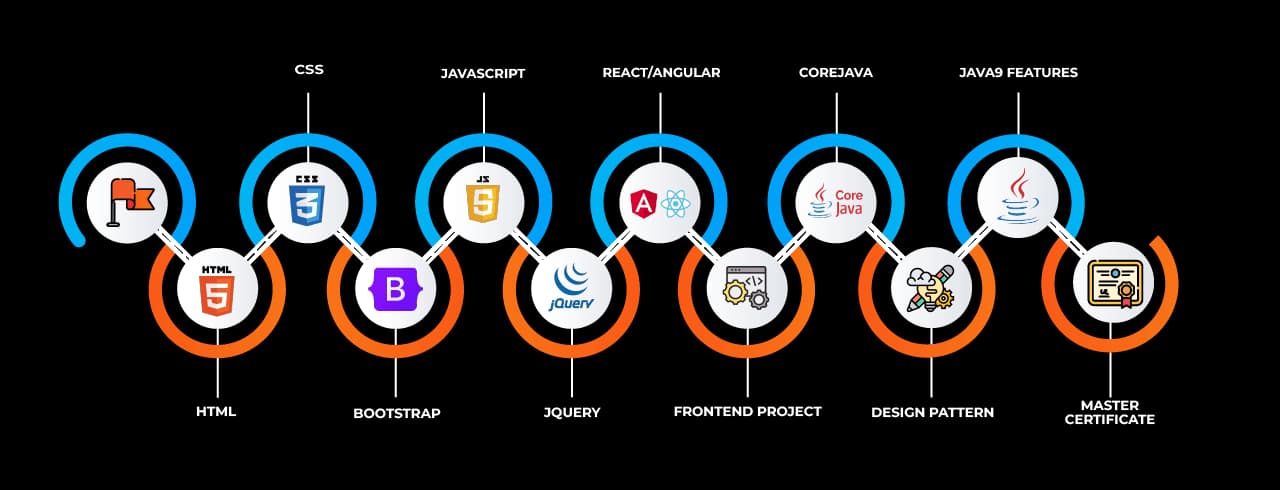
Full Stack Java Course learning curve
Java Full Stack learning curve

Tools you'll work with

  • ContainmentA relationship where one class contains an object of another class (HAS-A relationship).
  • PolymorphismAbility of an object to take multiple forms via method overloading and overriding.
  • Abstract ClassA class that cannot be instantiated and may contain abstract methods.
  • AnnotationsMetadata used to provide instructions to the compiler or runtime.
  • EnumA special Java type representing a fixed set of constants.
  • InheritanceMaster object-oriented programming (OOP) concepts to build modular and reusable code.
  • InterfaceIDoc: An IDoc (Intermediate Document) is a standard data format used in SAP to exchange information between different systems.
  • SwingA Java library for building desktop applications with rich UI components.
  • Object-Oriented Programming (OOP)Programming approach based on classes and objects.
  • Introduction to JavaLearn Java basics and how it powers enterprise applications.
  • Java Language FundamentalsCore syntax, datatypes, and control structures in Java.
  • Functional-style ProgrammingUse lambdas and streams for cleaner, concise code.
  • Utility ClassesJava’s built-in helper classes like Math, Arrays, and Collections.
  • Exception HandlingManage runtime errors using try-catch blocks.
  • GUI with AWT & SwingBuild desktop interfaces using Java’s GUI toolkits.
  • MultithreadingRun multiple threads to improve performance and responsiveness.
  • Lambda / Stream APIFunctional programming tools for efficient data processing.
  • Collection FrameworkJava structures like List, Set, Map for data management.
  • GenericsEnable type safety in collections and methods.
  • File I/O & Object SerializationRead/write files and save Java objects.
  • NetworkingBuild apps that communicate over the internet.
  • Unit TestingVerify code reliability using testing frameworks.
  • Introduction to SQLLearn to query and manage databases.
  • JDBCConnect Java apps with databases using Java Database Connectivity.
  • Maven / XMLBuild automation and project configuration tools.

Projects you'll build

  • BudgetFlow App

    BudgetFlow App

    A personal finance tracker for income, expenses and savings, with charts, spending insights, budgeting tips and savings goals.

    • GitHub
    • IntelliJ IDEA
    • SQL
  • PetPal App

    PetPal App

    An app for pet owners to track vaccinations, vet appointments and daily care, with reminders and a space to share tips with other owners.

    • Spring Boot
    • React.js
    • Kubernetes
  • TravelMate (Travel Planning Platform)

    TravelMate (Travel Planning Platform)

    A trip planner where users build itineraries, manage bookings and track travel spending, with recommendations, maps and reviews built in.

    • Docker
    • Eclipse
    • React.js
  • GreenThumb (Gardening and Plant Care App)

    GreenThumb (Gardening and Plant Care App)

    A plant care app with watering reminders, a searchable plant database with care guides and a community area for gardening advice.

    • Kubernetes
    • Spring Boot
    • SQL
  • Personal Fitness Tracking App

    Personal Fitness Tracking App

    A fitness tracker for workouts, goals and nutrition, with personalised plans, wearable integration and friendly challenges between friends.

    • React.js
    • Eclipse
    • SQL

See what you'll build

TaskController.java
@RestController@RequestMapping("/api/tasks")public class TaskController {  private final TaskService service;   public TaskController(TaskService service) {    this.service = service;  }   @GetMapping("/{id}")  public TaskDto getTask(@PathVariable Long id) {    return service.findById(id);  }}
GET /api/tasks/42 → 200 OK
{  "id": 42,  "title": "Write unit tests for TaskService",  "status": "IN_PROGRESS",  "dueDate": "2026-12-05"}
One of the first endpoints you'll write: constructor injection, a path variable and a clean JSON response from your service layer.

Certification path

  1. 1

    Build the projects

    Finish the module exercises and the capstone first — working code on GitHub is what interviewers look at before any certificate.

  2. 2

    Review the Oracle exam objectives

    The core Java and OOP modules overlap with the Oracle Java SE Developer (OCP) objectives; we show you which topics need extra practice.

  3. 3

    Take the OCP exam (optional)

    The Oracle Certified Professional: Java SE Developer exam is booked and paid for directly with Oracle, whenever you feel ready.

  4. 4

    Keep growing

    Once you're working, a cloud fundamentals certification such as AWS Certified Cloud Practitioner is a sensible next step for backend developers.

Job roles after this course

  • Junior Java Developer
  • Java Full Stack Developer
  • Trainee-FSD Java
  • Java Developer
  • Adv Java Developer
  • Senior Java Developer
  • Tech Lead
  • Sr. Tech Lead
  • Technical Manager
  • Frontend Developer

Enquire about this course

Request a call back

A counsellor replies with the right course, current fees and batch details.

We only use these details to reply to your enquiry.

About the Java Full Stack course

What is our Full Stack Java course?

This course teaches you to build complete, working web applications with Java on the server and modern web technology in the browser. We don't open with a wall of theory. We start with a tiny example of a web page talking to a Java back end, so you can see how a request travels through the server and how data moves between the browser and the database.

From there you climb one step at a time: HTML and CSS, JavaScript, core Java, then Spring Boot, Hibernate and databases. Every example is the kind of code you would actually write on a project.

  • This full-stack Java development program is for:
  • Beginners with no prior coding background
  • Learners with basic programming knowledge looking to specialize
  • Professionals seeking a career change from non-technical fields.
  • Java programmers looking to become front-end developers.

When you finish, you can build a front end, connect it to a Java back end, write Spring Boot APIs, manage the database and deploy the project to a test or production environment.

We keep a steady pace and lean on practice, so learners from any starting point can become dependable full stack Java developers.

Why do companies want full stack Java developers?

Teams increasingly want developers who can handle a feature end to end instead of passing it between groups. A full stack Java developer builds the interface, writes the Java back end, connects it to the database and ships it.

Java's reliability, scalability and long-term maintainability make it a favourite for enterprise work, especially in banking, finance and other large organisations. Well-written Java applications keep running and evolving for years, which is exactly why these teams keep hiring for it.

Here's why these skills matter right now:

  • Banks, financial firms and large enterprises run critical systems on Java.
  • Spring Boot has made Java back-end work faster to build, which has increased demand for developers who know it well.
  • Teams want to deliver quickly with fewer hand-offs, so people who can work across the stack are especially valuable.
  • The Java ecosystem stays relevant as frameworks change around it.

Banking, insurance, e-commerce and IT services all need people who can take a feature from the database to the screen and do it well: clean Java, sensible APIs, solid data handling and a usable interface. Those fundamentals stay useful whatever new tools come along, which makes full stack Java a practical, career-focused skill to learn.

How we teach Full Stack Java

Our approach is hands-on rather than lecture-led. You write code, test it, debug it and improve it until it works, which is how understanding actually sticks. You build REST APIs with Spring Boot, map entities with Hibernate, validate form input and connect front-end pages to the database.

Batches are kept small so each learner gets real attention. You are encouraged to write your own code, break it deliberately and then fix it with a trainer beside you. Each module ends with short, focused exercises that lock in what you covered.

What you get with us:

  • Small batches with direct access to your trainer
  • Practical sessions on Java fundamentals, Spring Boot and Hibernate
  • Project-based exercises instead of isolated theory
  • Help outside class hours with doubts and debugging
  • Guidance on Git, your resume and interview preparation
  • A calm, focused and structured learning environment

Finishing modules isn't the goal; being able to explain a real project is. By the end of the course you will have built one and can walk an interviewer through every decision. Whether you are a fresher or switching from another technology, the course builds your full stack skills steadily and practically.

What you will learn

We teach the stack layer by layer: the front end first, then the Java back end, the database and finally deployment. Each topic comes with practice, so by the time you start your project you have already used everything it needs.

You also learn the tools and workflow of a real full stack team. Modules follow the order of an actual project, so you write a form, design a database, add business logic and deploy the finished application.

The course covers:

  • Page structure and styling with HTML and CSS
  • JavaScript fundamentals and DOM handling
  • Core Java concepts and object-oriented programming
  • Back-end development using Spring Boot
  • Database management with Hibernate and SQL
  • Building and consuming REST APIs
  • Authentication and session handling
  • Version control using Git
  • Testing, debugging, and deployment practices
  • End-to-end project building using real workflows

Every module includes short practical tasks, such as adding a Java class, exposing a new API endpoint, styling part of a page or wiring a new database table into an existing app. Instead of learning each tool on its own, you learn to combine HTML, CSS, JavaScript and Java into one working application.

Where can this course take you?

Full stack Java opens a wide range of roles, because many organisations need developers who can handle both the web front end and the Java back end. Banking, finance, retail, healthcare and IT services all hire for it.

Most developers start by building and debugging features within a team. As experience grows, so does responsibility: owning APIs, managing databases and eventually looking after a whole module.

Typical roles after the course include:

  • Full Stack Java Developer
  • Java Developer
  • Back End Developer (Java/Spring Boot)
  • Front End Developer
  • Software Developer (Entry Level)
  • Application Support Engineer
  • Web Developer

With a few years of building larger systems, developers move into senior, technical lead or module lead roles, taking charge of bigger systems and mentoring others.

Pay varies with the city, the size of the company and, most of all, the strength of your portfolio. Developers who keep building and keep their skills current tend to progress fastest.

Because so much large-scale enterprise software runs on Java, skilled full stack Java developers remain in steady demand, which makes it a stable, long-term specialisation.

Can you learn full stack Java online?

Yes. The course is also available online, and many learners choose it because it fits around work, study and other commitments.

Online learners use the same project files, exercises and real-world examples as our classroom batches, with no reduction in depth or quality.

Online batches include:

  • Live, trainer-led sessions rather than pre-recorded videos
  • Screen sharing so you can debug with the trainer in real time
  • The chance to ask the trainer to repeat or explain a concept again
  • In-session practice on Spring Boot and Hibernate
  • Recordings to catch up on anything you miss
  • The same project structure and exercises as classroom batches

Online sessions run at fixed times and can be joined from anywhere, so they suit working professionals, students and freshers alike. Recordings make it easy to revisit a concept later.

Online or in the classroom, the aim is the same: practical, hands-on full stack Java training, not a library of videos.

How we keep your learning experience dependable

Trust matters when you choose a course, so we focus on three things: clear information before you join, consistent quality once your batch starts and honest placement support after you finish.

From the first day to the final certificate, you are kept informed about your batch, your progress and what comes next.

In practice, that means:

  • Batch timings are shared in advance and kept, with no last-minute changes.
  • Trainers specialise in Spring Boot, Hibernate and the rest of the stack, and keep the same standard across every batch.
  • Doubt-clearing time is available outside class hours.
  • Placement information is accurate: resume help, mock interviews and job referrals, with no false promises.
  • Every class is recorded, so you can catch up or revise whenever you need.
  • Online and classroom batches follow the same structured syllabus.
  • Batch sizes allow individual attention from your trainer throughout.

What learners value most is not just the syllabus but the experience: the projects they complete and the confidence to explain them. That practical experience is what makes them ready for the industry, and by the end of the course they understand everything they have built.

Skills that pair well with full stack Java

The course gives you the core skills of a full stack Java developer. Real projects often reach further, into data, cloud deployment and more, so adding one or two complementary skills can make you a more rounded developer.

Skills that often sit alongside full stack Java on real projects:

Data Science – for applications that use data and real-time insights.

Data Analytics – to understand how users behave and how your application performs.

Python – a popular back-end language that complements Java well.

Cloud Computing – to deploy your applications and scale them.

Cyber Security – to protect web applications from attacks.

SAP – for enterprise business solutions.

Generative AI and AI – to add intelligent features to your applications.

ChatGPT and chatbots – to build AI-powered assistants into web platforms.

DevOps – for continuous integration and automated deployment.

Power BI – for data visualisation and dashboards.

Salesforce – for CRM-based web solutions.

Core Java – still the foundation of enterprise web applications.

Adding one or two of these to your full stack Java skills can open more specialised roles and make you a more versatile developer.

Common questions

1. What does a full stack Java course cover?

It teaches you to build complete web applications: Java and Spring Boot with Hibernate on the server, HTML, CSS and JavaScript in the browser, and REST APIs that connect the two.

2. How long does it take to learn full stack Java?

It depends on the format you choose and how deep the programme goes. Ask us through the enquiry form for the current schedule of your batch.

3. Do I need core Java before I start?

No. The course starts with Java fundamentals such as OOP, syntax and data structures, then moves on to frameworks and real projects. Knowing some Java already simply means you move faster.

4. Is full stack Java a good career choice?

Yes. Java is one of the most widely used enterprise languages, so IT companies and start-ups keep hiring full stack Java developers, and pay grows with experience and the strength of your portfolio.

5. Which topics are included?

Core Java and OOP, then Spring, Spring Boot, Hibernate and REST APIs for the back end, HTML, CSS and JavaScript for the front end, and databases such as MySQL and MongoDB, all applied in real-time projects from build to deployment.


Java Full Stack FAQs

Is Java full stack a good career choice in 2026?

Yes, it's still a solid choice. Large organisations keep their core systems on Java, so there's steady demand for developers who can maintain and extend Spring Boot services and also build the screens on top. Knowing both sides makes you useful on small teams and easier to move between projects.

Can I switch to Java development from a non-IT background?

Yes, plenty of developers started in commerce, mechanical, civil or support roles. The course begins from zero and builds up in small steps, and the projects give you proof of skill that matters more than your degree title. Expect to put in regular practice outside class, especially in the first few weeks.

Is Java harder to learn than Python or JavaScript?

Java is a little more verbose at the start, but not harder to reason about. Its strict types and clear structure actually help beginners catch mistakes early, and the habits you form carry over to any language you learn later.

Why React with Spring Boot instead of Angular?

React is lighter to learn and widely used across product companies, so it gets you building screens faster. The concepts you learn — components, state, calling APIs — transfer directly if a future team uses Angular.

Do I need a high-end laptop for the course?

No. A laptop with a recent 64-bit OS, at least 8 GB of RAM and an SSD runs IntelliJ IDEA, MySQL and a React dev server comfortably. If you're unsure about your machine, mention its specs when you enquire.

Will I get placement support after the Java course?

Yes, placement support covers resume reviews, GitHub portfolio feedback, mock technical interviews and interview preparation. We don't promise a job — no honest institute can — but we help you become the candidate who can explain and demo real work.

When does the next Java full stack batch start?

Batch dates and timings are planned per intake and change through the year. Fill in the enquiry form or call us to get the current start dates, timings and fees.

Page last reviewed on .