Skip to content
Best Java Classesin Pune

SAP

SAP ABAP Course in Pune

This SAP ABAP course teaches you to write the programs that extend SAP for a business. You start with the ABAP Data Dictionary and core syntax, then build reports, ALV lists, Smart Forms, module pool screens, BAPIs and enhancements, and finish with data migration and ABAP on HANA. It suits programmers and graduates aiming for SAP technical roles.

  • Practical ABAP training for anyone moving into SAP technical work
  • Learn from trainers who have written ABAP on real SAP projects
  • Hands-on sessions and project work from the first module

SAP ABAP Course

SAP ABAP: quick answers

What is SAP ABAP?
ABAP is SAP's own programming language. ABAP developers build the custom reports, forms, interfaces and enhancements that make standard SAP fit how a company works.
Do I need coding experience?
Some programming background helps, but the course starts with ABAP basics such as data types, conditions, loops and internal tables, so motivated beginners can keep up.
Is ABAP a technical or a functional SAP role?
Technical. Functional consultants (FICO, MM and others) configure business processes; ABAP developers write the code those processes need.
Where do I find fees, duration and batch timings?
They change with each intake, so our counsellors share them on request. Use the enquiry form or call us.

SAP ABAP syllabus

23 modules, from fundamentals to job-ready practice.
  1. 01

    INTRODUCTION TO SAP ABAP

    • Overview of SAP ABAP: Introduction to the SAP ABAP programming language and its role in SAP systems.
  2. 02

    SAP ABAP DICTIONARY

    • ABAP DATA BASE TABLE:
    • Understanding database tables in ABAP Dictionary and their significance in data storage.
    • Components of Database Table in ABAP DDIC:
    • Exploring table attributes, fields, data elements, domains, and technical settings.
    • Creation of Database Table and Display Contents:
    • Steps to create a database table and view its stored records.
    • Creating Currency and Quantity Fields for Database Table:
    • Defining currency and quantity fields with appropriate reference fields.
  3. 03

    STRUCTURES IN ABAP

    • Creating a Structure (Include Structure):
    • Defining reusable structures to store and manage related data.
    • Assigning Structure to Table:
    • Integrating structures into tables to streamline data organization.
  4. 04

    FOREIGN KEY RELATIONSHIP

    • Creation of Foreign Key Relationship Between Two Tables:
    • Establishing referential integrity by linking related tables using foreign keys.
  5. 05

    INDEXES FOR DATABASE TABLE

    • Creation of Secondary Index:
    • Enhancing data retrieval performance by creating additional indexes.
  6. 06

    VIEWS IN SAP ABAP

    • Creation of Base View:
    • Defining a database view to combine data from multiple tables.
    • Creation of Projection View:
    • Creating a simplified view with selected fields from a single table.
    • Creation of Maintenance View:
    • Enabling table data maintenance through a user-friendly view.
    • Creation of Help View:
    • Using help views to provide search assistance for field values.
  7. 07

    LOCK OBJECTS IN DDIC

    • Creation of Lock Object:
    • Implementing lock mechanisms to prevent data inconsistencies in parallel processing.
  8. 08

    TABLE TYPE

    • Overview of Table Types:
    • Understanding different types of tables in ABAP and their usage in data storage and processing.
  9. 09

    TABLE MAINTENANCE GENERATOR (TMG)

    • Creation of TMG for Database Table:
    • Generating table maintenance screens for easy data management.
    • Creating Transaction Code for Table Maintenance Generator:
    • Assigning a transaction code to access the TMG functionality.
  10. 10

    SEARCH HELP

    • Creating Elementary Search Help:
    • Defining a simple search help for user input assistance.
    • Creating Collective Search Help:
    • Combining multiple search helps to provide broader selection options.
  11. 11

    TYPES OF TABLES IN SAP ABAP

    • Overview of Table Types:
    • Exploring standard tables, sorted tables, hashed tables, and index tables.
  12. 12

    SYSTEM VARIABLES

    • Creating Program Using System Variables:
    • Utilizing system variables for dynamic data handling in ABAP programs.
    • Creating a Database Table Using System Variables:
    • Defining table fields dynamically using system variables.
  13. 13

    CONDITIONAL STATEMENTS

    • Creating a Program Using All Conditional Statements:
    • Implementing IF, CASE, and nested conditions for logic flow control.
  14. 14

    LOOP BREAK STATEMENTS

    • Create a Program Using EXIT Statement:
    • Exiting a loop based on a specific condition.
    • Create a Program Using STOP Statement:
    • Terminating program execution at a defined point.
    • Create a Program Using CONTINUE Statement:
    • Skipping the current loop iteration and proceeding to the next cycle.
  15. 15

    INTERNAL TABLE AND WORK AREA

    • Understanding Internal Tables and Work Areas:
    • Managing temporary datasets for efficient data processing.
  16. 16

    INTERNAL TABLE OPERATIONS

    • Performing Operations on Internal Tables:
    • Inserting, modifying, reading, and deleting records in internal tables.
  17. 17

    JOINS

    • Creating a Program Using INNER JOIN:
    • Fetching data from multiple tables based on matching records.
    • Creating a Program Using OUTER JOIN:
    • Retrieving data from multiple tables, including unmatched records.
  18. 18

    MODULARIZATION TECHNIQUES

    • Micros:
    • Implementing small reusable code blocks for better program structure.
    • Include:
    • Modularizing programs by splitting them into separate include files.
    • Function Module:
    • Creating and using function modules for reusable logic.
    • Subroutine:
    • Defining and calling subroutines for modular program execution.
  19. 19

    MODULE POOL PROGRAMMING

    • Overview of Module Pool Programming:
    • Developing custom transaction screens with event-driven programming.
  20. 20

    BAPI (Business Application Programming Interface)

    • Understanding BAPI:
    • Using standardized interfaces to integrate SAP modules with external systems.
  21. 21

    ENHANCEMENTS

    • Using Call Customer Function:
    • Implementing customer-specific enhancements within standard SAP code.
    • Using SMOD Transaction:
    • Exploring SAP-provided enhancement spots for custom development.
    • BADI (Business Add-ins):
    • Using object-oriented enhancement techniques for flexible modifications.
    • Using CL_EXITHANDLER:
    • Dynamically determining and executing enhancement implementations.
    • Using SE84 Tcode:
    • Exploring repository objects for enhancements and modifications.
  22. 22

    DATA MIGRATION

    • LSMW (Legacy System Migration Workbench):
    • Automating data migration from legacy systems to SAP.
    • BDC (Batch Data Communication):
    • Recording and processing bulk data transfers using batch input methods.
    • DMC (Data Migration Cockpit):
    • Using the SAP-provided tool for seamless data migration in S/4HANA.
  23. 23

    INTRODUCTION TO ABAP ON HANA CLOUD

    • ABAP Development Tool (ADT):
    • Using Eclipse-based ABAP development for modern SAP applications.
    • Steps to Create an ABAP Project in Eclipse:
    • Setting up and managing ABAP projects in the Eclipse environment.
    • Introduction to CDS (Core Data Services) and AMDP (ABAP Managed Database Procedures):
    • Leveraging HANA-optimized database techniques for high-performance data access.
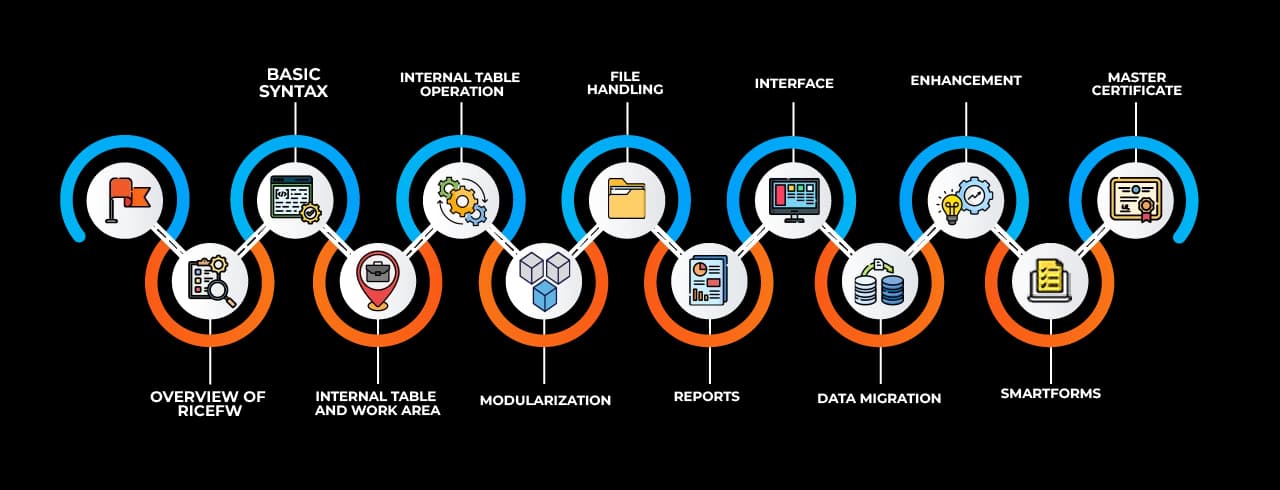
SAP ABAP Course learning curve
SAP ABAP learning curve

Tools you'll work with

  • ABAP Data DictionaryThink of the ABAP Data Dictionary as a storage space where we define and manage database tables, views, and structures, ensuring that data is consistent across the system.
  • Data Dictionary ObjectsIn SAP, Data Dictionary Objects include tables, views, data elements, domains, and structures that help us define how data is stored and processed.
  • Internal Table and Work AreaAn Internal Table is like an in-memory database table that stores temporary data, and a Work Area is a single-row storage used to process this data.
  • String Operations in ABAPWe often need to manipulate text, so string operations in ABAP help us modify, split, and format text data for better processing and output.
  • Internal Table OperationsIn ABAP, we perform various operations on internal tables like inserting, updating, deleting, and sorting data efficiently.
  • Database Table OperationsWith Database Table Operations, we retrieve, modify, and delete records directly from SAP's database using Open SQL statements.
  • Condition StatementSAP ABAP provides condition statements like IF, CASE, and LOOP to control the flow of a program based on specific conditions.
  • Modularization TechniquesTo keep our code structured and reusable, we use modularization techniques like subroutines, function modules, and classes.
  • Include ProgramAn Include Program is a reusable piece of code that we can insert into multiple programs to avoid duplication.
  • SubroutineA Subroutine (FORM/ENDFORM) is a modular block of code that we define once and call multiple times within an ABAP program.
  • Functional ModulesA Function Module is a predefined block of reusable code stored centrally in SAP, allowing us to perform standard operations across different programs.
  • MacrosSAP Macros are short reusable code snippets, mainly used for writing repetitive operations within reports
  • Selection ScreenA Selection Screen is the input screen we create for users to enter parameters before running an ABAP report.
  • File Handling on Presentation ServerThis allows us to read and write files on the user's local system using OPEN DATASET and GUI_DOWNLOAD methods.
  • File Handling on Application ServerUnlike the Presentation Server, the Application Server file handling deals with storing and processing files directly on the SAP server.
  • RICEFWThis stands for Reports, Interfaces, Conversions, Enhancements, Forms, and Workflows, which are key components in SAP customization.
  • ReportsClassical Reports: A Classical Report is the simplest type of ABAP report, which displays output in a list format without any interactivity.
  • Interactive ReportsUnlike Classical Reports, Interactive Reports allow users to click on a row to get detailed data on a second screen.
  • ALV ReportsALV (ABAP List Viewer) Reports offer a more user-friendly display with sorting, filtering, and export options in SAP reports.
  • InterfaceIDoc: An IDoc (Intermediate Document) is a standard data format used in SAP to exchange information between different systems.
  • RFC (Remote Function Call)An RFC allows communication between different SAP systems or between SAP and external applications.
  • BAPI (Business Application Programming Interface)A BAPI is a standardized function module provided by SAP that allows external applications to communicate with the SAP system.
  • Data MigrationLSMW, BDC, BAPI: These are techniques to transfer data into SAP; LSMW (Legacy System Migration Workbench), BDC (Batch Data Communication), and BAPI help in migrating large amounts of data efficiently.
  • EnhancementImplicit Enhancement: An Implicit Enhancement lets us modify SAP standard programs without modifying the original code, using predefined enhancement points.
  • Enhancement Point and SectionEnhancement Points allow us to insert additional logic, while Enhancement Sections replace standard SAP code with custom logic.
Projects you'll build

  • Develop ALV

    Develop ALV or Interactive Reports Based on Business Need

    Turn a real business requirement into an ALV or interactive report that users can filter, sort and drill into for sales, stock or finance data.

    • SAP ABAP Editor
    • ABAP Debugger
    • ABAP Code Inspector
  • Design Smart Forms

    Design Smart Forms for Business Documents

    Design Smart Forms for documents such as invoices, purchase orders and delivery notes, pulling the right data from SAP automatically.

    • ABAP Code Inspector
    • ABAP Debugger
    • ABAP Workbench
  • Enhancement of Standard

    Enhancement of Standard SAP Functionality

    Extend a standard SAP transaction with user exits, BAdIs and enhancement points, without changing SAP's own code.

    • SAP ABAP Editor
    • ABAP Debugger
    • ABAP Workbench
  • Data Migration

    Data Migration

    Move data from an older system into SAP: extract it, clean and convert it, then load it while keeping it accurate.

    • ABAP Workbench
    • ABAP Code Inspector
    • SAP ABAP Editor
  • Business Process Automation

    Business Process Automation Using BDC

    Write BDC programs that automate repetitive data entry across SAP transactions and cut down on manual mistakes.

    • ABAP Workbench
    • SAP ABAP Editor
    • ABAP Code Inspector

Career paths

Job roles after this course

  • ABAP Developer
  • ABAP Consultant
  • ABAP Programmer
  • SAP Technical Consultant
  • ABAP Programmer
  • SAP Technical Consultant
  • ABAP team lead
  • SAP Solution Developer
  • ABAP Architect
  • SAP Integration Specialist
  • ABAP Quality Assurance Specialist
  • SAP Technical Architect

Enquire about this course

Request a call back

A counsellor replies with the right course, current fees and batch details.

We only use these details to reply to your enquiry.

About the SAP ABAP course

What is SAP ABAP, and what do ABAP developers do?

SAP runs finance, purchasing, sales and production for a large number of companies, but no company uses it exactly as it comes. ABAP is the language used to close that gap. As an ABAP developer you write the reports managers read, the forms that get printed and emailed, the interfaces that connect SAP to other systems, and the enhancements that adjust standard behaviour.

What will you learn?

We start with how SAP stores data and build up to the work you will do on a project:

  • ABAP Data Dictionary: tables, structures, foreign keys, indexes, views, lock objects, search helps and the table maintenance generator.
  • Core ABAP: system variables, conditions, loops, internal tables, work areas and joins.
  • Modularisation: includes, subroutines, function modules and macros.
  • Reports and screens: classical, interactive and ALV reports, selection screens and module pool programming.
  • Integration and change: RFC, BAPIs, enhancements, data migration and an introduction to ABAP on HANA.

Why choose a career in SAP ABAP?

Companies that run SAP keep needing new reports, forms and integrations, and every SAP rollout or upgrade brings more ABAP work. That gives ABAP developers a steady place in SAP teams, and the role can grow into technical consulting, integration and architecture with experience.

How do projects prepare you?

ABAP makes sense once you write it against real business requirements. Each major topic ends in a project that mirrors project work: a report, a form, an enhancement, a data migration or an automated data-entry program. Trainers review your code and show you how experienced developers would approach the same problem.

Who should join?

Graduates in computer science, IT or engineering, programmers who want to move into SAP, and SAP functional consultants who want to understand the technical side. Some programming background helps, but we cover ABAP from the basics.

How ABAP fits with SAP FICO and MM

Functional consultants decide how a process should work; ABAP developers write the code when configuration alone isn't enough. If you are also curious about the functional side, see our SAP FICO and SAP MM courses.

Career support

Our career team helps with your resume, runs mock interviews on ABAP topics and shares relevant openings. No institute can promise you a job, so the focus is on making your project work easy to explain.

Classroom and live online batches follow the same syllabus, and companies can ask for corporate ABAP training planned around their own SAP landscape. Fees and timings change per intake, so our counsellors share them on request.

SAP ABAP FAQs

What will I build during the course?

Five projects: ALV and interactive reports, Smart Forms for invoices and purchase orders, an enhancement to a standard SAP transaction, a data migration, and BDC programs that automate data entry.

Which roles can I apply for afterwards?

ABAP Developer, ABAP Consultant, SAP Technical Consultant and, with experience, roles such as SAP Integration Specialist or ABAP Architect.

Does the course cover ABAP on HANA?

Yes, as an introduction at the end of the course, after the classic ABAP topics are in place.

Can I learn SAP ABAP online?

Yes. Live online batches follow the same syllabus and projects as the classroom. Ask us which timings are open.

Do you help with placements?

Yes, with resume reviews, mock technical interviews on ABAP topics and relevant openings. No institute can guarantee a job, so we focus on making sure you can explain your project work clearly.

Page last reviewed on .